
How to Add Questions to a HoldATime Reservation Request
Date published: October 2, 2026
Author: Kelly Fansler, Founder HoldATime
Add questions to a HoldATime reservation request from one question bank, attach them to a resource, and keep the answers on that booking.
Add extra questions to a HoldATime reservation request from one question bank, then attach only the questions that belong on each resource (amenity). A court can ask for player count. A clubhouse can ask about chairs and a screen. A resource with no questions attached books exactly as it does today.
If you have not published a resource yet, start with How to set up amenity reservations with HoldATime. When someone should review the answers before the time is confirmed, continue with How to set up multiple approvers for a resource or amenity. A booking fee is separate: if the resource charges, payment still comes first. See How to set up payments for amenity reservations.
What you can ask
Each question uses one answer type:
- Short text or long text
- Yes or no, or yes or no with a follow-up
- A number
- One choice
- Multiple choice, where the booker selects every option that applies
Mark a question required or optional. Required answers block the reservation until they are filled in. Optional answers can be skipped. HoldATime does not accept file uploads on these questions.
How to add questions to a reservation request
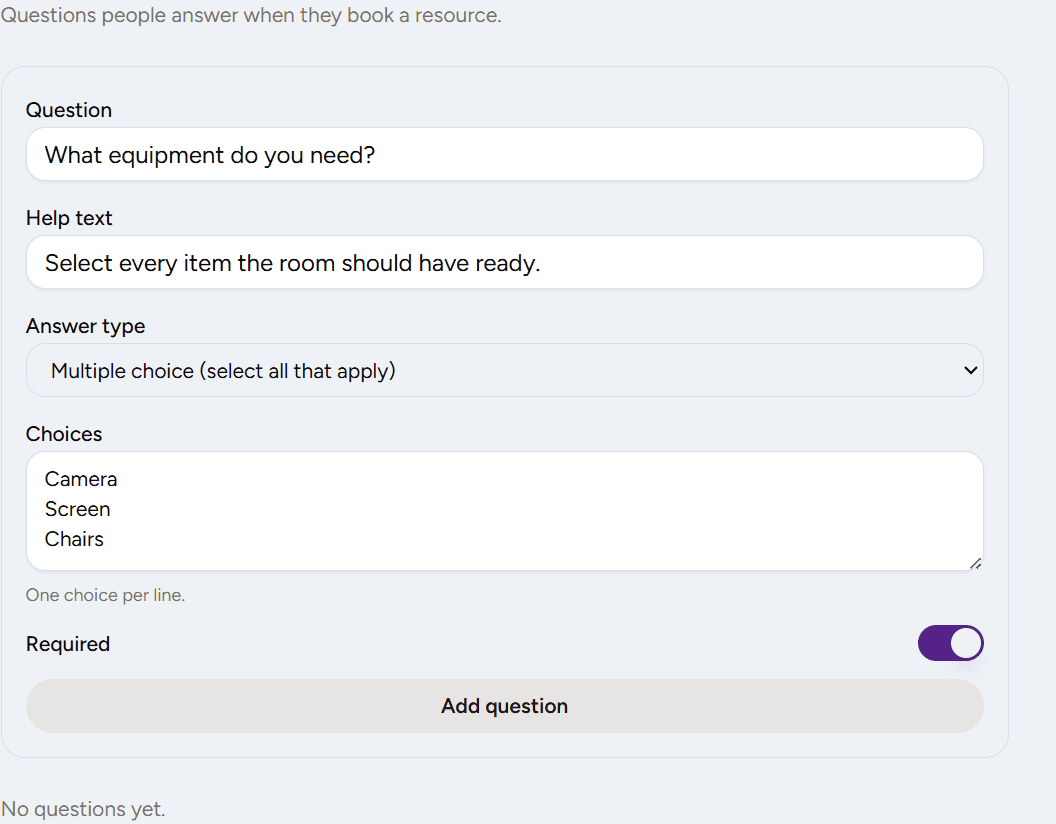
- Open Booking questions. Under Resources, open Booking questions. This is the organization question bank. Questions live here until you attach them to a resource.
- Add a question and choose an answer type. Add a question. Choose short text, long text, yes or no, yes or no with a follow-up, number, one choice, or multiple choice. Multiple choice needs at least two choices, one per line. Mark the question required or optional.
- Attach questions to the resource. Edit the resource and attach the questions that belong on that booking. A resource with no questions attached books the same way it does today.
- Book a test reservation. Book a test reservation. The Questions step appears between picking a time and review. Required answers must be filled in before you can continue. Multiple choice saves every selected label.
- Confirm the answers on the reservation. Open the reservation and confirm the answers are saved on that request. Later edits to the question bank do not rewrite old answers. Answers cannot be edited after submit, and file uploads are not supported.
Frequently asked questions
Can I add questions without requiring approval?
Yes. Questions work whether the resource confirms immediately or waits for approval. Attach questions when you need the information. Turn on approval only when someone must review the request before it is confirmed.
What is the difference between required and optional?
A required question must be answered before the reservation can be submitted. An optional question can be left blank, and a blank optional answer is not saved on the reservation.
Do questions apply to every resource?
No. The question bank is shared by the organization, but each resource has its own attachments. Leave a resource with no questions attached and that booking stays unchanged.
What happens if I change a question after someone has booked?
The reservation keeps the question label, type, and answer from the moment it was booked. Editing or reordering the bank does not rewrite older reservations.
How does multiple choice work?
The booker can select every choice that applies. At least one selection is required when the question is required. The reservation stores the selected labels together, such as Camera, Screen.
Where this helps
The same bank works for a clubhouse or meeting room, a court or field, and shared equipment. Attach a different set of questions to each resource. Old reservations keep the answers that were submitted. New bookings use the questions attached now.
Sign up free or review HoldATime pricing when you are ready to add the first question.
In the product
Booking questions: add a question to the organization bank and choose the answer type. 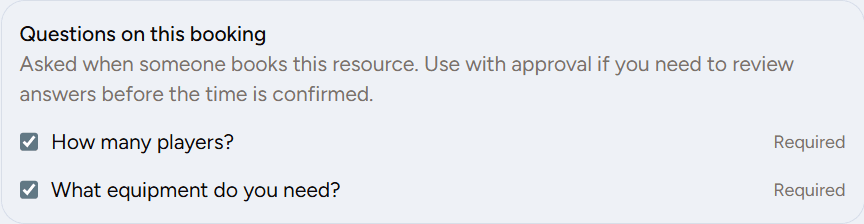
Attach questions on the resource. A resource with none attached books the same way it does today. 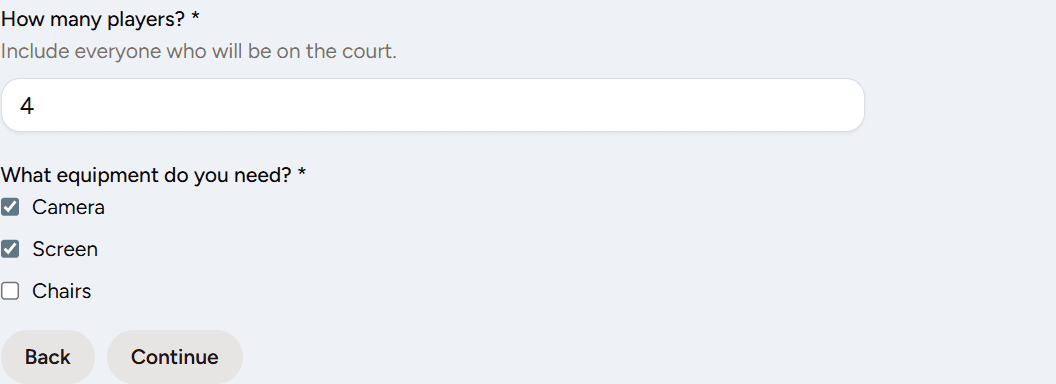
Bookers answer on the Questions step between time and review. Required answers must be filled in.