
How to Set Up Multiple Approvers for a Resource or Amenity
Date published: October 2, 2026
Author: Kelly Fansler, Founder HoldATime
Choose None, Any Admin, or an approval group so every current member must approve a HoldATime resource before the reservation is confirmed.
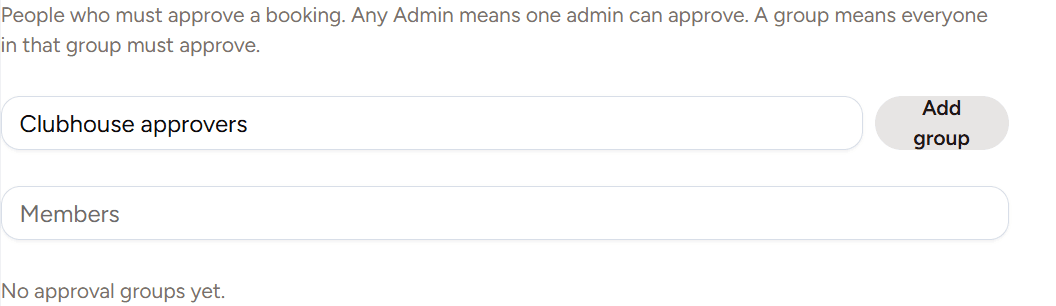
Set up multiple approvers for a HoldATime resource (amenity) when one admin should not be the only person who can say yes. None confirms the booking. Any Admin lets one admin decide. An approval group waits until every current member approves, and one deny rejects the request.
Create the resource first with How to set up amenity reservations with HoldATime. Collect details on the request with How to add questions to a HoldATime reservation request. If the resource also charges a fee, payment still happens before approval. See How to set up payments for amenity reservations.
Before you start
- You can open organization settings and edit the resource.
- Each approver already has a HoldATime account in the organization.
- You know whether one admin is enough, or every person in a named group must approve.
How to set up multiple approvers
- Open Approval groups. Under Resources, open Approval groups. Name a group and add members by searching their name or email. Group members can approve that resource. They are not full admins. An empty group cannot be selected on a resource.
- Choose who must approve. Edit the resource and set Requires approval to None, Any Admin, or a named group.
- Know what each choice does. None confirms the booking. A booking fee still waits for payment before the time is confirmed. Any Admin lets one admin approve or deny, and the first action wins. A group requires every current member to approve. One deny rejects the request immediately.
- Deny with a reason. A deny needs a written reason. The booker and every approver who can see the request see who denied it and why. After a deny, no one else can approve or deny that request.
- Ask the booker a question without resetting approval. Asking a question does not clear approvals and does not deny the request. The booker replies in the app. If the organization has no sending address, HoldATime shows a link to set one up and does not send the email.
Frequently asked questions
What is the difference between Any Admin and an approval group?
Any Admin means one organization admin can approve or deny, and the first action decides the request. An approval group means every current member of that group must approve. One deny from anyone in the group rejects the request.
What if I add or remove someone while a request is open?
A person you remove no longer has to approve. An approval they already gave still counts. A person you add must still approve before the request can be confirmed. The group that matters is the current membership, not the membership from when the request was created.
How do repeating reservations work with approval?
Any Admin confirms or denies the whole series in one action. With an approval group, each pending reservation in the series records that member's approval, and a reservation is confirmed only when every current member has approved it.
What do the pending counts mean?
An approver's count is requests still waiting on that person. After they approve, their count drops even if other group members have not acted yet. After anyone denies, the count drops for everyone in scope. A booker's count is reservations where an approver asked a question they have not answered. Ordinary waiting and denials are not counted as booker pending.
Can group members manage the whole organization?
No. Approval group members can approve or deny the resources that use that group. They do not become organization admins.
Where this helps
A clubhouse reservation often needs more than one person to agree before the room is confirmed. A court or field can stay on Any Admin when any board member can approve. Shared equipment can use a small group when checkout needs a second set of eyes. The pending count on Reservations is the work still waiting on you, not every open request in the organization.
Sign up free or review HoldATime pricing when you are ready to name the first approval group.
In the product
Approval groups: name the group, then add members by name or email. An empty group cannot be selected on a resource. 
On the resource, set Requires approval to None, Any Admin, or a named group. 
A deny shows who denied the request and the reason. A question already asked stays on the reservation.